

使用 WP-CLI 批量运行翻译
您可以使用 WP-CLI 和 bash 脚本批量运行翻译。这样您就可以在处理其他工作的同时,在后台运行翻译任务。
为此,需要创建两个 bash 脚本:
- 包含批量处理逻辑的主脚本(无需更改)
- 定义要翻译内容的配置文件(每次翻译运行时更新)
主脚本
创建一个名为 gatotranslate.sh 的文件(下载示例),包含翻译处理逻辑:
您可以自定义传递给 gatotranslate 命令的参数(例如:--status-to-update=draft、--status-when-translated=same-as-origin、--parts=properties 等)。
#!/bin/bash
# ------------------------------------------------------------------------------------------------
# Load configuration
# ------------------------------------------------------------------------------------------------
SCRIPT_DIR="$(cd "$(dirname "${BASH_SOURCE[0]}")" && pwd)"
source "${SCRIPT_DIR}/gatotranslate.config.sh"
# ------------------------------------------------------------------------------------------------
# Arguments
# ------------------------------------------------------------------------------------------------
# (Optional) Provide the start batch number as an argument, default is 1
start_batch=${1:-1}
# ------------------------------------------------------------------------------------------------
# Logic
# ------------------------------------------------------------------------------------------------
batch_size=${batch_size:-1} # If not provided, default to 1
total_items=${#items[@]}
total_batches=$(((total_items + batch_size - 1) / batch_size))
start_batch_index=$(((start_batch - 1) * batch_size))
echo "----------------------------------------"
echo "Translating $subcommand items"
echo "----------------------------------------"
echo "Batch size: $batch_size"
echo "Total items: $total_items"
echo "Total batches: $total_batches"
echo "Starting from batch number: $start_batch"
echo "----------------------------------------"
for ((start=start_batch_index; start<total_items; start+=batch_size)); do
# Get the next batch of items
batch=("${items[@]:$start:$batch_size}")
echo "Processing batch #$((start/batch_size + 1))"
# Pass all items in the batch as separate arguments
cmd=$(printf 'wp gatotranslate %s "%s" --status-to-update=any --user=%s' "$subcommand" "${batch[*]}" "$user")
echo "Command: $cmd"
eval $cmd
exit_code=$?
if [ $exit_code -ne 0 ]; then
echo -e "\a\a\a\a\a"
exit 1
fi
done
# Finished successfully
echo -e "\a"
echo "----------------------------------------"
echo "Finished successfully 👏"
echo "----------------------------------------"配置文件
创建一个名为 gatotranslate.config.sh 的文件(下载示例),包含批量翻译的配置:
user="admin"
subcommand="post"
batch_size=1
items=(
4118
4117
4116
3739
)该文件必须包含以下变量:
| 变量 | 说明 |
|---|---|
user | 执行命令的 WordPress 用户名(通常为 admin) |
subcommand | 要执行的 gatotranslate WP-CLI 子命令(post、media、term 或 menu) |
batch_size | 每批翻译的条目数(默认为 1) |
items | 要翻译条目的 ID 数组(文章、标签、分类、媒体、菜单等) |
执行脚本
请在 WordPress 根目录下执行,该目录中 wp 命令可用。
要运行批量翻译,请执行:
bash +x gatotranslate.sh脚本将按指定的批次大小对所有条目执行 gatotranslate 命令,并显示每批次的进度信息。
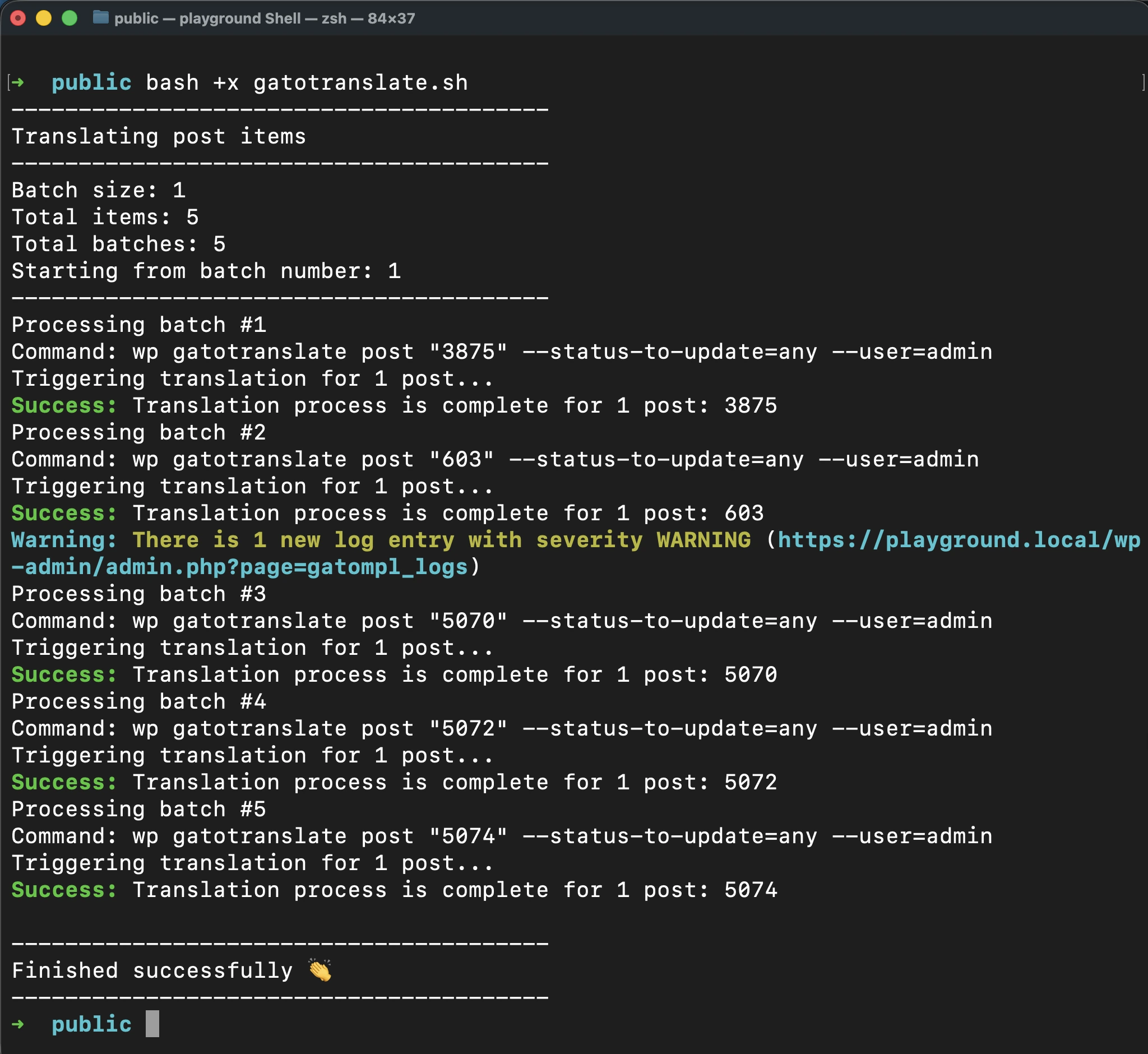
脚本成功完成后,会发出单次提示音。
发生错误时停止执行
若要在日志中出现错误或警告时自动停止脚本,请在 gatotranslate.sh 中的命令添加 --fail-if-log-notifications 参数:
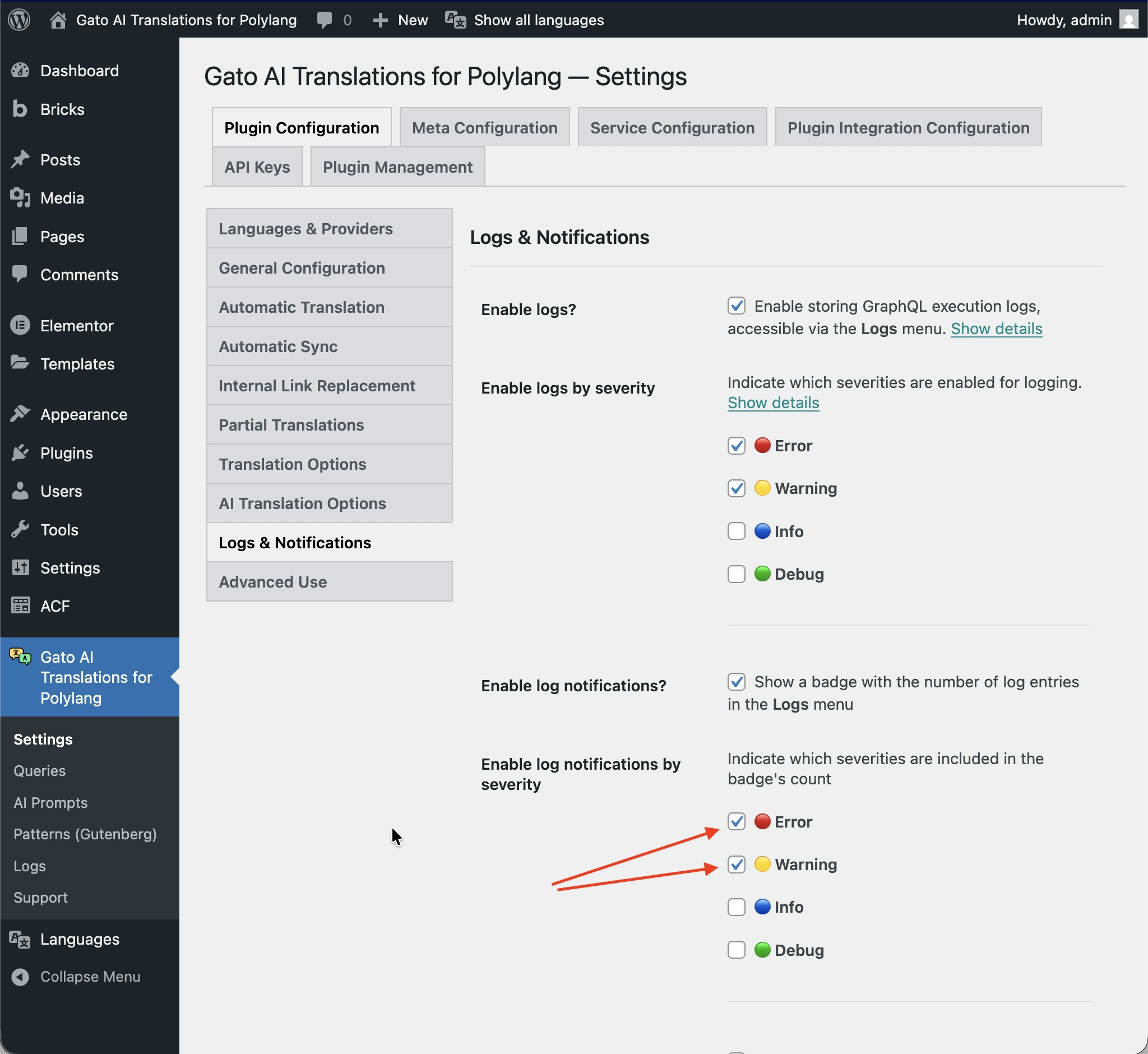
cmd=$(printf 'wp gatotranslate %s "%s" --fail-if-log-notifications --status-to-update=any --user=%s' "$subcommand" "${batch[*]}" "$user")触发脚本停止的日志通知严重级别,以 Settings > Plugin Configuration > Logs & Notifications 页面中的配置为准。
当脚本因日志通知而停止时,会发出一段连续提示音。
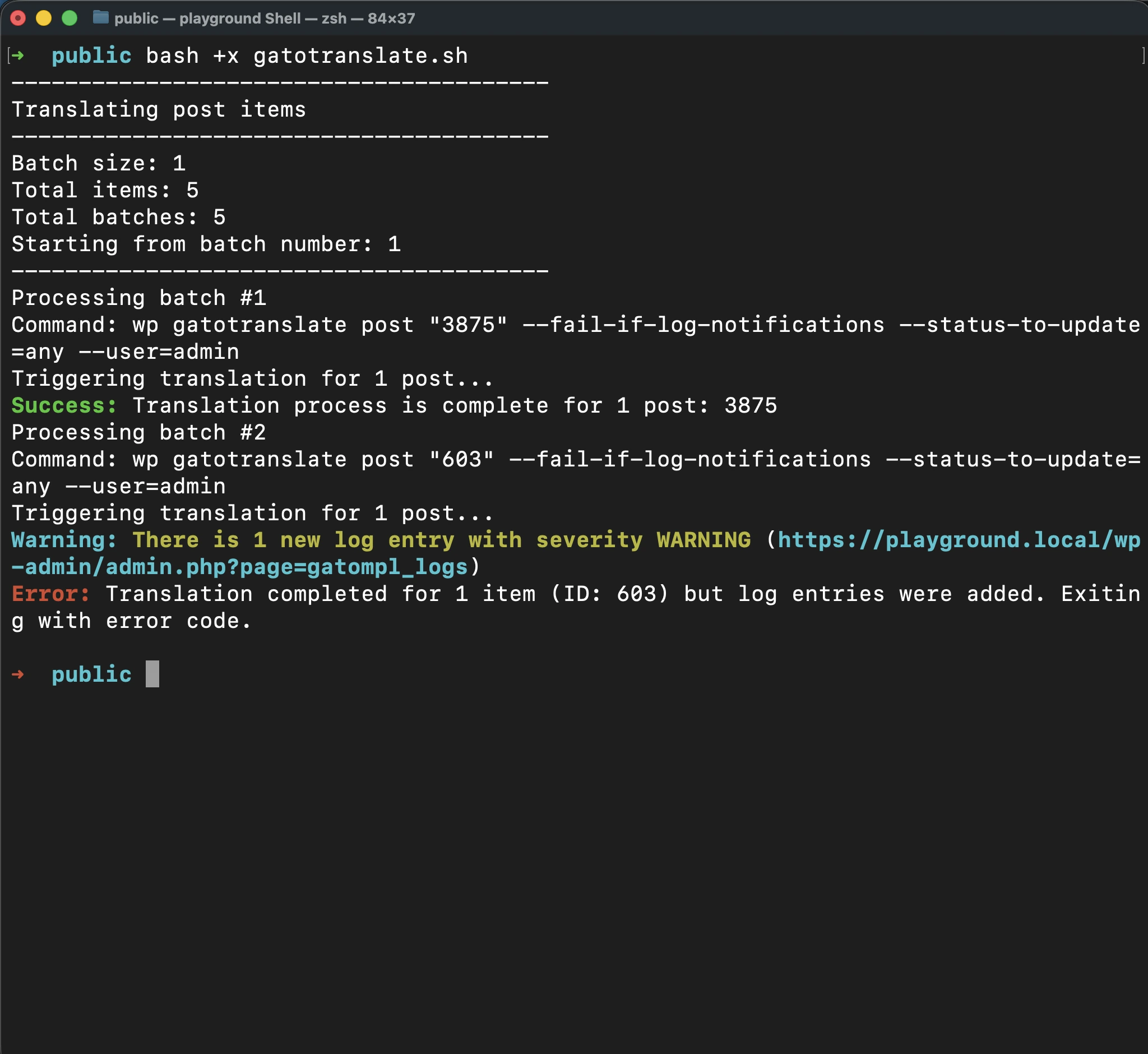
修复问题后,可以通过传入批次编号作为参数,从失败处继续翻译。
这样可以避免重新处理已成功翻译的条目,节省时间和 API 额度。
例如,如果在批次 2 处发生失败,修复问题后执行:
bash +x gatotranslate.sh 2进阶:获取要翻译条目的 ID
配置批量翻译时,您需要知道要翻译条目的 ID。
由于插件在底层运行 Gato GraphQL,我们可以方便地执行 GraphQL query 来获取这些信息。
要执行 GraphQL query,必须先启用 Advanced Mode 并访问 Queries CPT。请参阅创建辅助 Query了解如何启用 Advanced Mode。
添加一个新的 Queries 条目,标题设为 Retrieve item IDs,并输入以下 GraphQL query:
query RetrieveIDsForCustomPosts {
customPosts(
filter: {
#########################################################
### Configure which CPTs to retrieve ###
customPostTypes: [ "post", "page" ],
#########################################################
polylangLanguagesBy: { predefined: DEFAULT }
},
pagination: { limit: -1 },
sort: { by: DATE, order: DESC }
) @export(as: "ids") {
id
title
customPostType
}
compiledData: self {
ids: _arrayJoin( array: $ids, separator: " " )
}
}
query RetrieveIDsForCategories {
categories(
#########################################################
### Configure which taxonomy to retrieve ###
taxonomy: "category",
#########################################################
filter: { polylangLanguagesBy: { predefined: DEFAULT } },
pagination: { limit: -1 },
sort: { by: NAME, order: DESC }
) @export(as: "ids") {
id
name
taxonomy
}
compiledData: self {
ids: _arrayJoin( array: $ids, separator: " " )
}
}
query RetrieveIDsForTags {
tags(
#########################################################
### Configure which taxonomy to retrieve ###
taxonomy: "post_tag",
#########################################################
filter: { polylangLanguagesBy: { predefined: DEFAULT } },
pagination: { limit: -1 },
sort: { by: NAME, order: DESC }
) @export(as: "ids") {
id
name
taxonomy
}
compiledData: self {
ids: _arrayJoin( array: $ids, separator: " " )
}
}
query RetrieveIDsForMedia {
mediaItems(
filter: { polylangLanguagesBy: { predefined: DEFAULT } },
pagination: { limit: -1 },
sort: { by: DATE, order: DESC }
) @export(as: "ids") {
id
title
}
compiledData: self {
ids: _arrayJoin( array: $ids, separator: " " )
}
}
#################################################################################################
# Watch out: This will bring all menus, not just the ones in the origin language.
# Translated menus are those with a location containing the "___" string,
# e.g.: "header___es", "footer___fr", etc.
#################################################################################################
query RetrieveIDsForMenus {
menus(
pagination: { limit: -1 },
sort: { by: NAME, order: DESC }
) @export(as: "ids") {
id
name
locations
}
compiledData: self {
ids: _arrayJoin( array: $ids, separator: " " )
}
}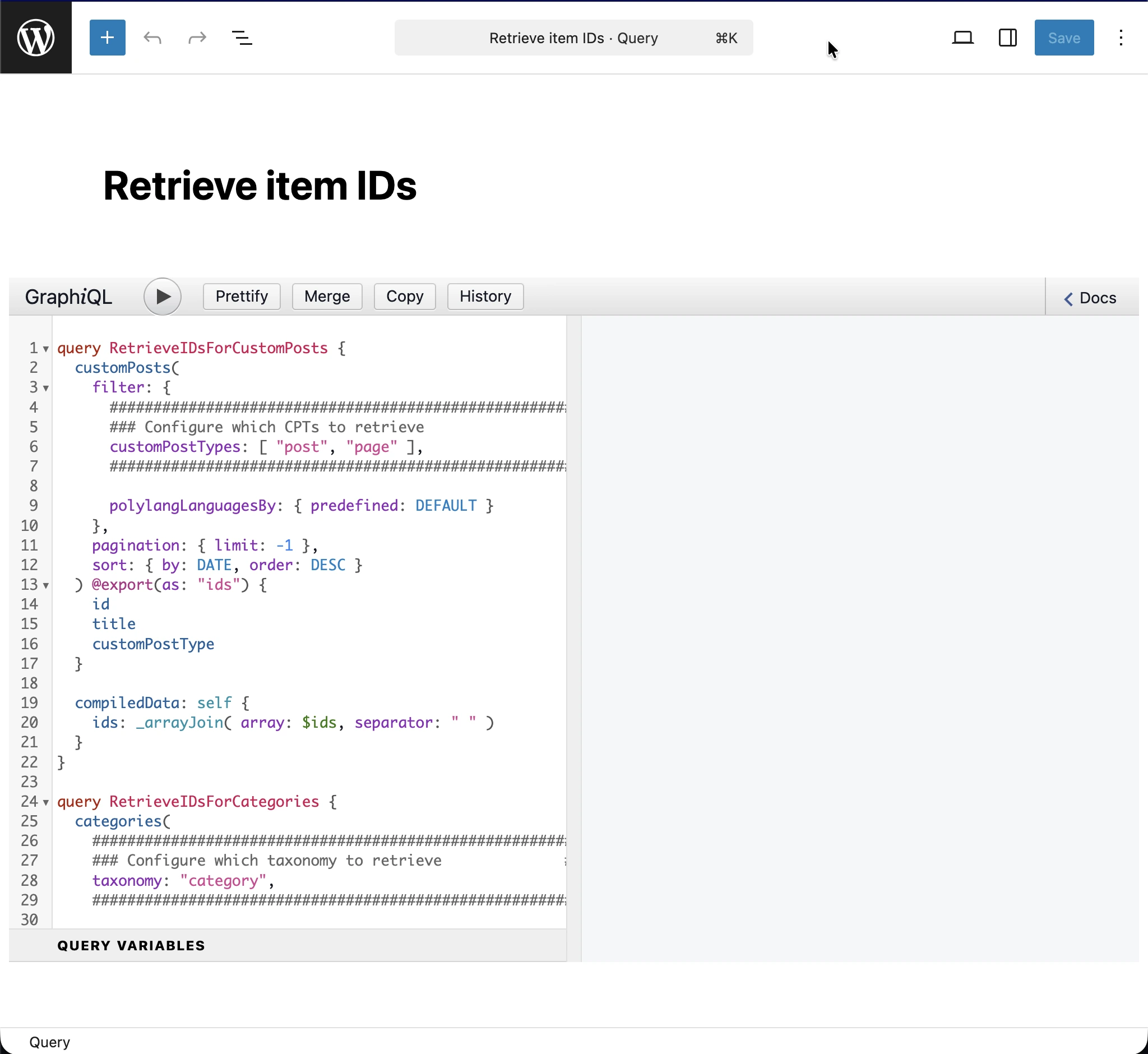
根据您要翻译的实体类型,需要配置并执行 query 中对应的操作。
例如,若要获取文章分类的 ID,需要传入分类法 category 作为参数,执行 RetrieveIDsForCategories 操作:
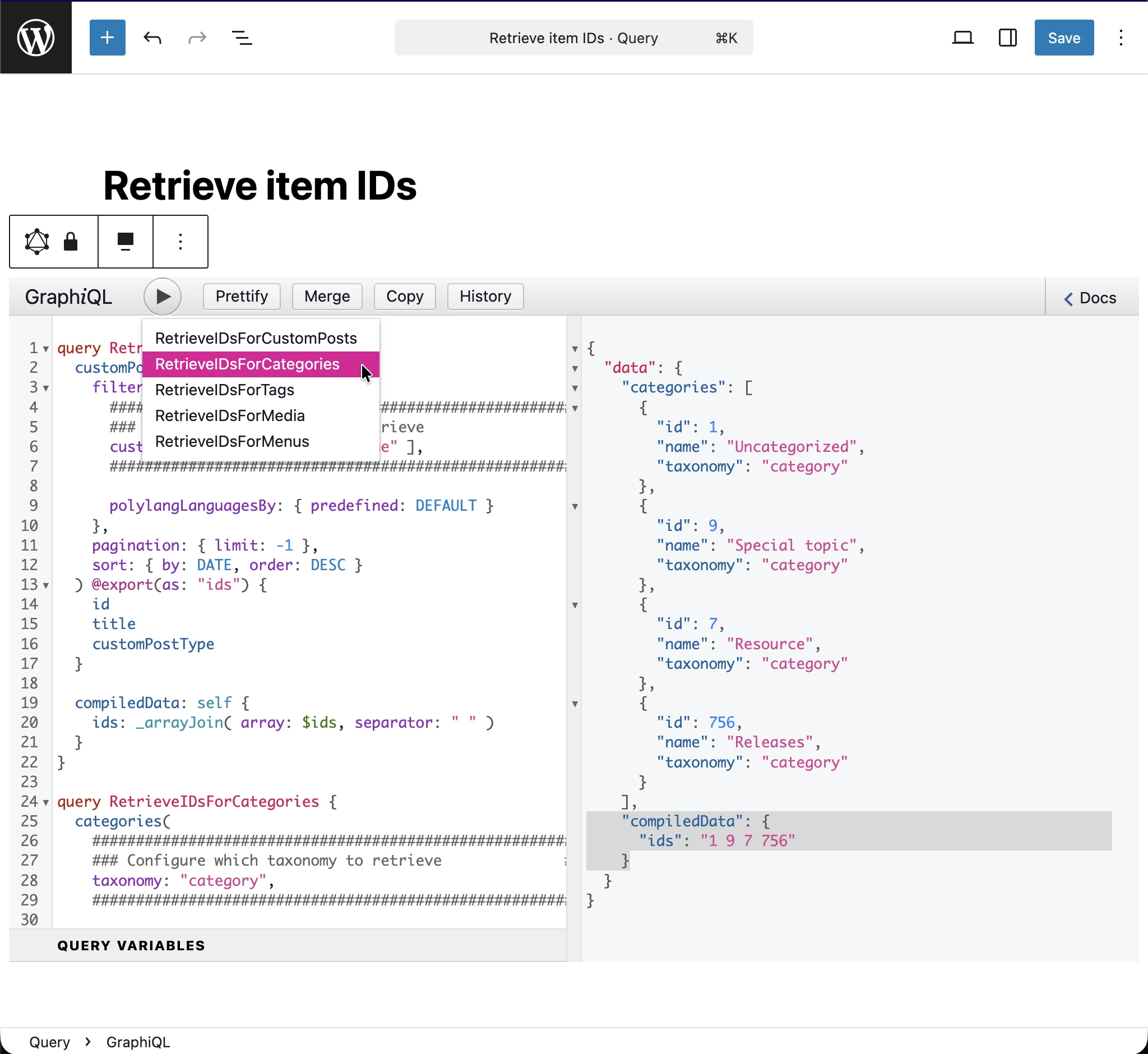
从 JSON 响应中,要翻译条目的 ID 会输出在 data.compiledData.ids 条目中(图中高亮显示)。复制该字符串并存入配置文件的 items 数组中。