Gutenberg
Gutenberg 的支持已内置,可翻译 Gutenberg 内容中的所有区块。
Gato AI Translations for Polylang 从 Gutenberg 内容的区块中提取字符串,并仅翻译这些字符串,确保内容不会受到任何破坏。
开箱即用,以下区块类型会被自动支持:
- WordPress 核心区块
- 纯 PHP 区块
- Advanced Custom Fields (ACF) 区块
- 所有附带
wpml-config.xml的区块 - 第三方区块:
- Kadence Blocks
- Greenshift blocks
- GenerateBlocks blocks
- Yoast SEO blocks
支持的 WordPress 核心区块
以下 WordPress 核心区块开箱即用地受到支持:
core/audiocore/block(即同步模式)core/buttoncore/covercore/embedcore/headingcore/htmlcore/imagecore/listcore/list-itemcore/media-textcore/paragraphcore/preformattedcore/pullquotecore/quotecore/tablecore/versecore/video
纯 PHP 区块
从 WordPress 7.0 开始,区块可以注册为纯 PHP(无 JavaScript 包)。Gato AI Translations for Polylang 将它们与其他区块一视同仁:开箱即用支持,无需额外配置。
所有字符串属性(枚举类型和其他标量类型除外)都会自动注册以供翻译。
如果某个特定字段不应被翻译,可以通过 gatompl:gutenberg_block_type_translatable_attribute_regexes 钩子将其设为 false(或使用 unset)来排除:
add_filter(
'gatompl:gutenberg_block_type_translatable_attribute_regexes',
static function (array $regexes): array {
// Either of these works:
unset($regexes['my-plugin/alert']['header']);
$regexes['my-plugin/alert']['implications'] = false;
return $regexes;
}
);Advanced Custom Fields (ACF) 区块
通过 Advanced Custom Fields 注册的区块也开箱即用地受到支持。将 ACF 字段注册以供翻译有 3 种方式:
1. 自动翻译所有字段(通过设置页面)
进入设置页面,在 Plugin Integration Configuration > Advanced Custom Fields 下,启用 Translate ACF blocks automatically? 选项:
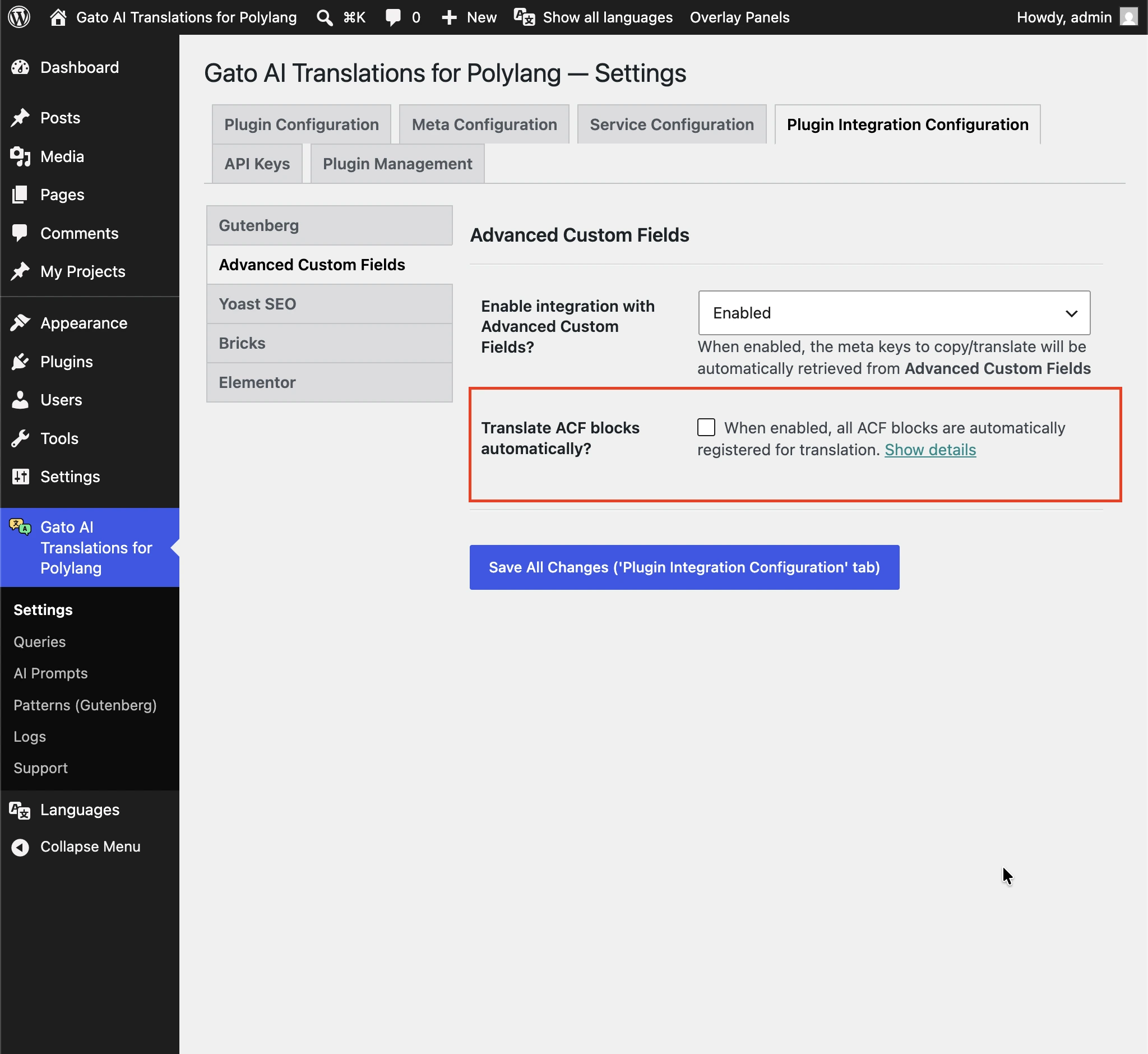
启用后,每个 ACF 区块上的所有可翻译字符串字段都会被发送进行翻译。如果某个特定字段不应被翻译,可通过标准 ACF 钩子 acf/load_field 将 gatompl 设为 'skip' 来排除:
// Disable translation for a single field by key
add_filter(
'acf/load_field/key=product_card_sku',
static function (array|false $field): array|false {
if (is_array($field)) {
$field['gatompl'] = 'skip';
}
return $field;
}
);
// Or disable several fields at once
add_filter(
'acf/load_field',
static function (array|false $field): array|false {
if (
is_array($field) && in_array($field['key'] ?? null, [
'product_card_feature_title',
'product_card_specs_dimensions',
'product_card_section_text_heading',
])
) {
$field['gatompl'] = 'skip';
}
return $field;
}
);2. 逐字段设置(通过 ACF 字段组配置)
使用 acf_add_local_field_group() 定义字段组时,在每个需要翻译的字段中直接添加 'gatompl' => 'translate':
acf_add_local_field_group([
'key' => 'group_testimonial',
'title' => 'Testimonial Block',
'fields' => [
[
'key' => 'testimonial_text',
'label' => 'Testimonial',
'name' => 'testimonial',
'type' => 'textarea',
'gatompl' => 'translate',
],
[
'key' => 'testimonial_role',
'label' => 'Role',
'name' => 'role',
'type' => 'text',
// Option-array form — equivalent to `'gatompl' => 'translate'`,
// but leaves room for future plugin-side options on the same field
'gatompl' => [
'translation_configuration' => 'translate',
],
],
[
'key' => 'testimonial_featured_post',
'label' => 'Featured post',
'name' => 'featured_post',
'type' => 'post_object',
'post_type' => ['post'],
'return_format' => 'object',
'gatompl' => 'translate', // The referenced post ID is remapped to the target-language post
],
],
'location' => [
[
[
'param' => 'block',
'operator' => '==',
'value' => 'acf/testimonial',
],
],
],
]);此方式同样适用于 post_object、relationship、taxonomy、image、gallery 和 repeater 字段:插件会沿嵌套 repeater 路径追踪到任意深度,并将实体引用(文章、分类、媒体)重新映射到目标语言的对应项。
3. 逐字段设置(通过 acf/load_field 钩子)
如果无法编辑字段组注册,可通过与排除字段相同的 ACF 钩子来将字段加入翻译:
add_filter(
'acf/load_field/key=testimonial_text',
static function (array|false $field): array|false {
if (is_array($field)) {
$field['gatompl'] = 'translate';
}
return $field;
}
);注册 ACF 区块
以下是与上述字段组配套的最简区块注册示例(使用 ACF PRO 的 acf_register_block_type):
add_action('acf/init', function (): void {
if (!function_exists('acf_register_block_type')) {
return;
}
acf_register_block_type([
'name' => 'testimonial',
'title' => 'Testimonial',
'description' => 'A testimonial block.',
'render_template' => plugin_dir_path(__FILE__) . 'acf-blocks/testimonial/template.php',
'category' => 'widgets',
'icon' => 'format-quote',
'keywords' => ['testimonial', 'quote'],
'mode' => 'preview',
]);
});WPML Config
Gato AI Translations for Polylang 会自动读取任意插件附带的 wpml-config.xml,并用其判断哪些区块属性可翻译。
Attempt Recovery 提示
翻译后,部分区块可能在编辑器中显示 Attempt Recovery 提示:
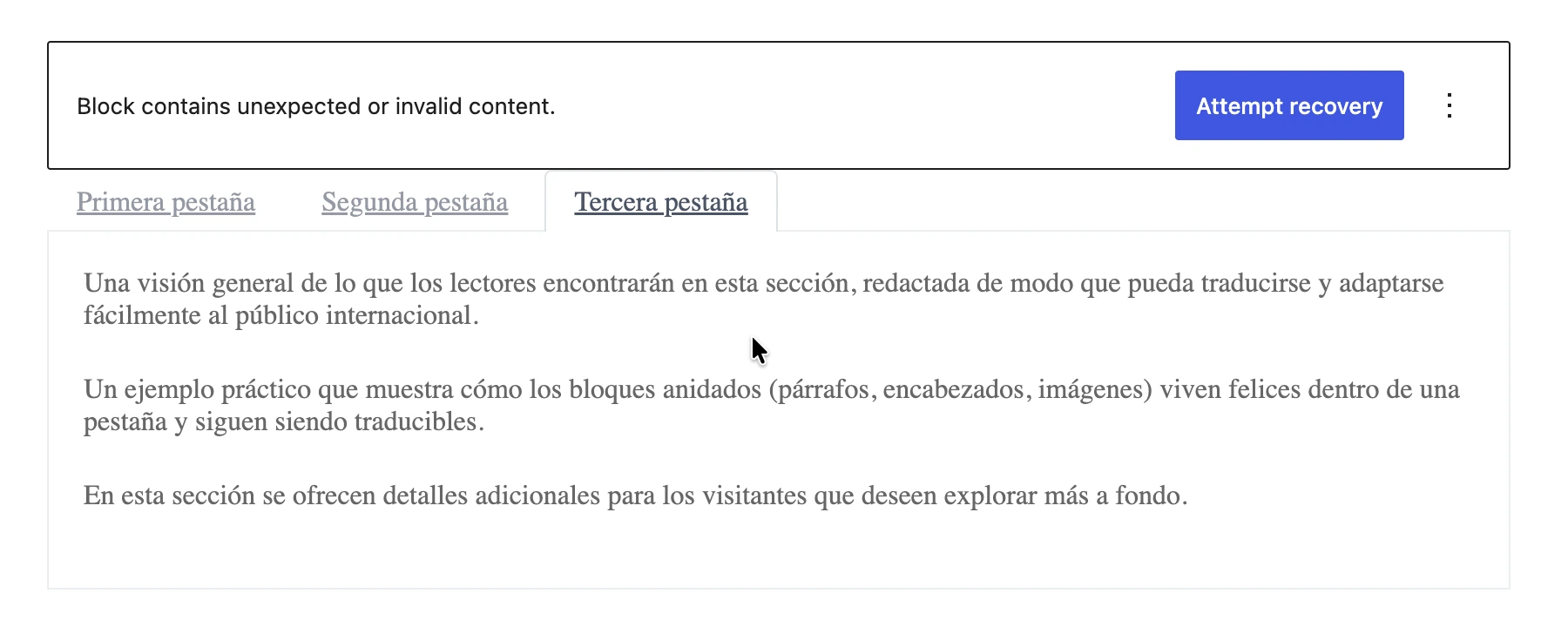
详情请参阅为什么某些区块在翻译后需要"Attempt Recovery"?
禁用特定属性的翻译
要禁用通过 wpml-config.xml 定义的特定属性(或区块的所有属性)的翻译,可从 gatompl:use_wpml_config_for_block_type 过滤器返回 false:
add_filter(
'gatompl:use_wpml_config_for_block_type',
static function (bool $enabled, string $blockTypeName, string $ruleKind): bool {
// Stop reading wpml-config.xml rules for greenshift-blocks/button
if ($blockTypeName === 'greenshift-blocks/button') {
return false;
}
return $enabled;
},
10,
3
);Kadence Blocks
Kadence Blocks 插件的所有区块均通过其 wpml-config.xml 自动支持。
以下区块在翻译后可在前端正常渲染,但在编辑器中打开时可能显示 Attempt Recovery 提示:
kadence/single-iconkadence/tabskadence/form
点击 Attempt Recovery 会重建区块的 HTML,但这是可选操作——前端输出已经正确(查看详情)。
Greenshift Blocks
Greenshift 的所有区块均通过其 wpml-config.xml 自动支持。
Greenshift 的已翻译区块通常需要在编辑器中对每个区块点击 Attempt Recovery 以重新生成其 HTML(查看详情)。
GenerateBlocks
GenerateBlocks 和 GenerateBlocks PRO 的区块:
- Container
- Grid
- Text
- Button
- Headline
- Image
- Query
- Shape
- Site Header
- Accordion
- Tabs
- Navigation
Yoast SEO
这些区块仅支持简单字符串。包含 HTML 标签(包括链接、图片、strong 或 italic 等 HTML 样式、换行等)的字符串不受支持。
详情请阅读指南所有 Gutenberg 区块都可以翻译吗?
Yoast SEO 的区块:
- Yoast How-to
- Yoast FAQ
支持其他区块
您可以翻译应用程序中的自定义区块或第三方插件的区块。
请查阅翻译其他 Gutenberg 区块指南了解更多信息。
翻译同步模式
WordPress 默认的外观 > 模式页面不支持翻译同步模式(也称为可复用区块),原因如下:
- Polylang 不添加用于选择语言的小部件(仅 Polylang PRO 支持)
- 该页面不提供批量操作,因此无法翻译现有模式
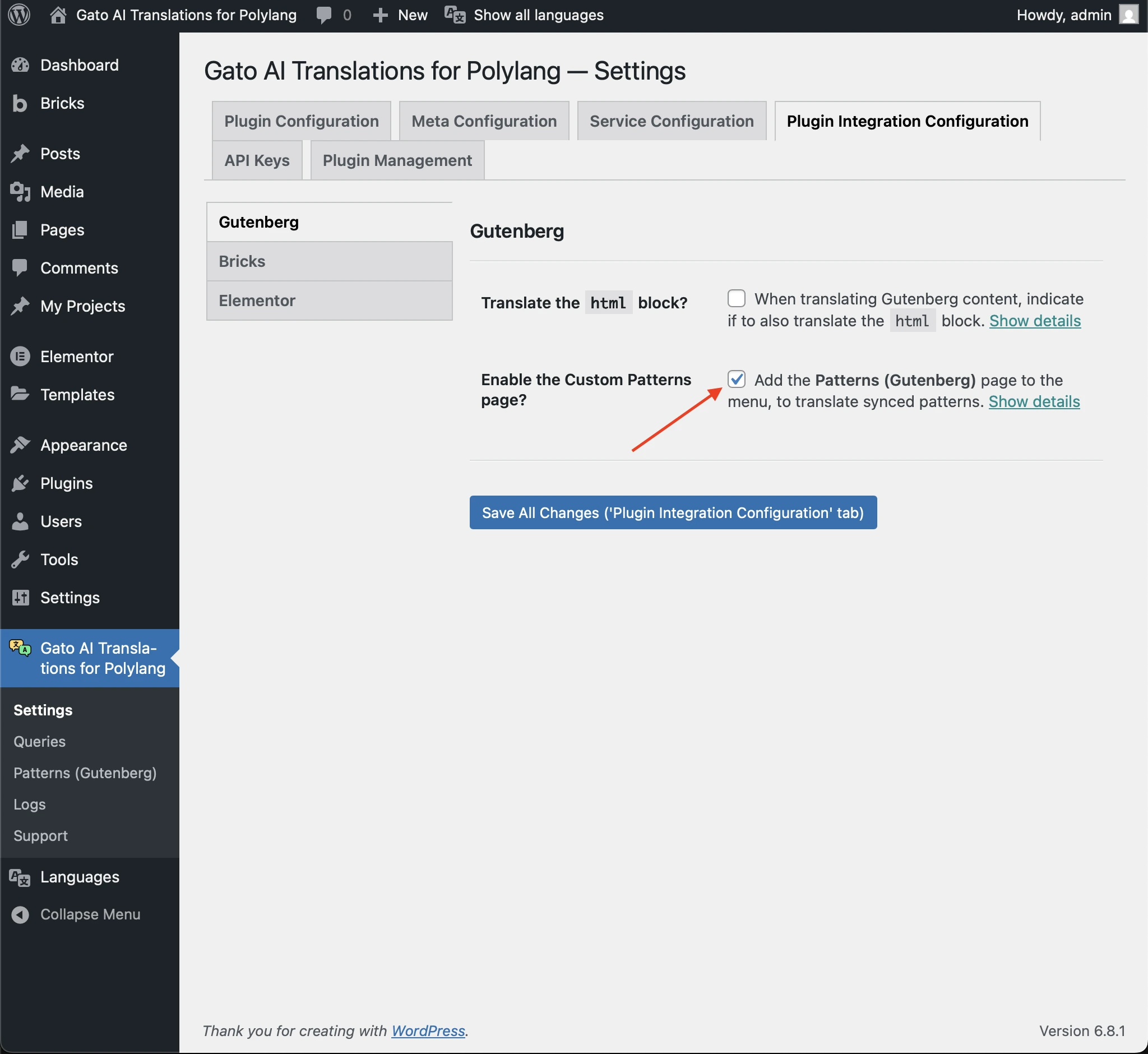
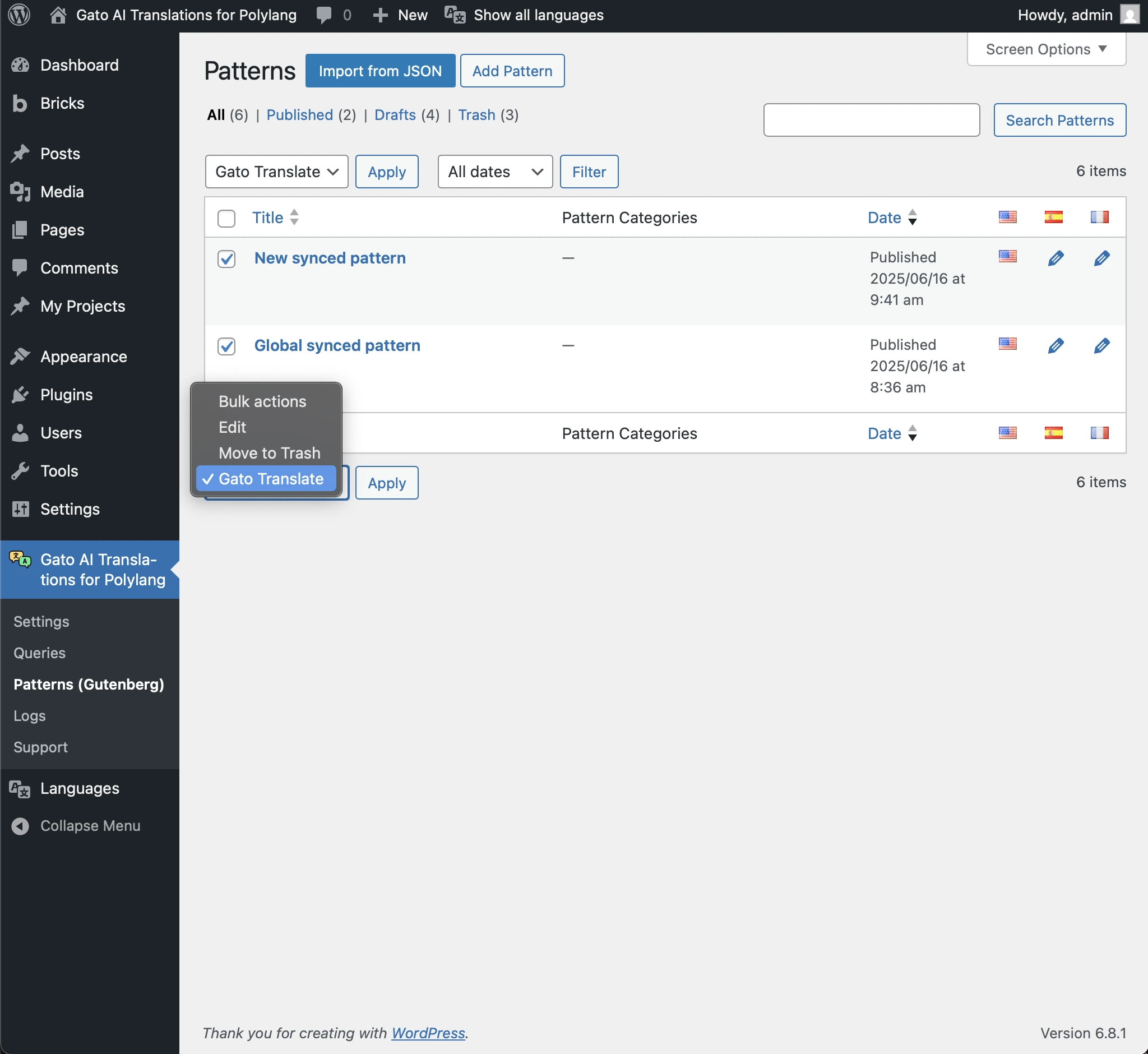
为此,Gato AI Translations for Polylang 在菜单项 Patterns (Gutenberg) 下提供了标准的 Patterns CPT 页面,以启用这些功能。
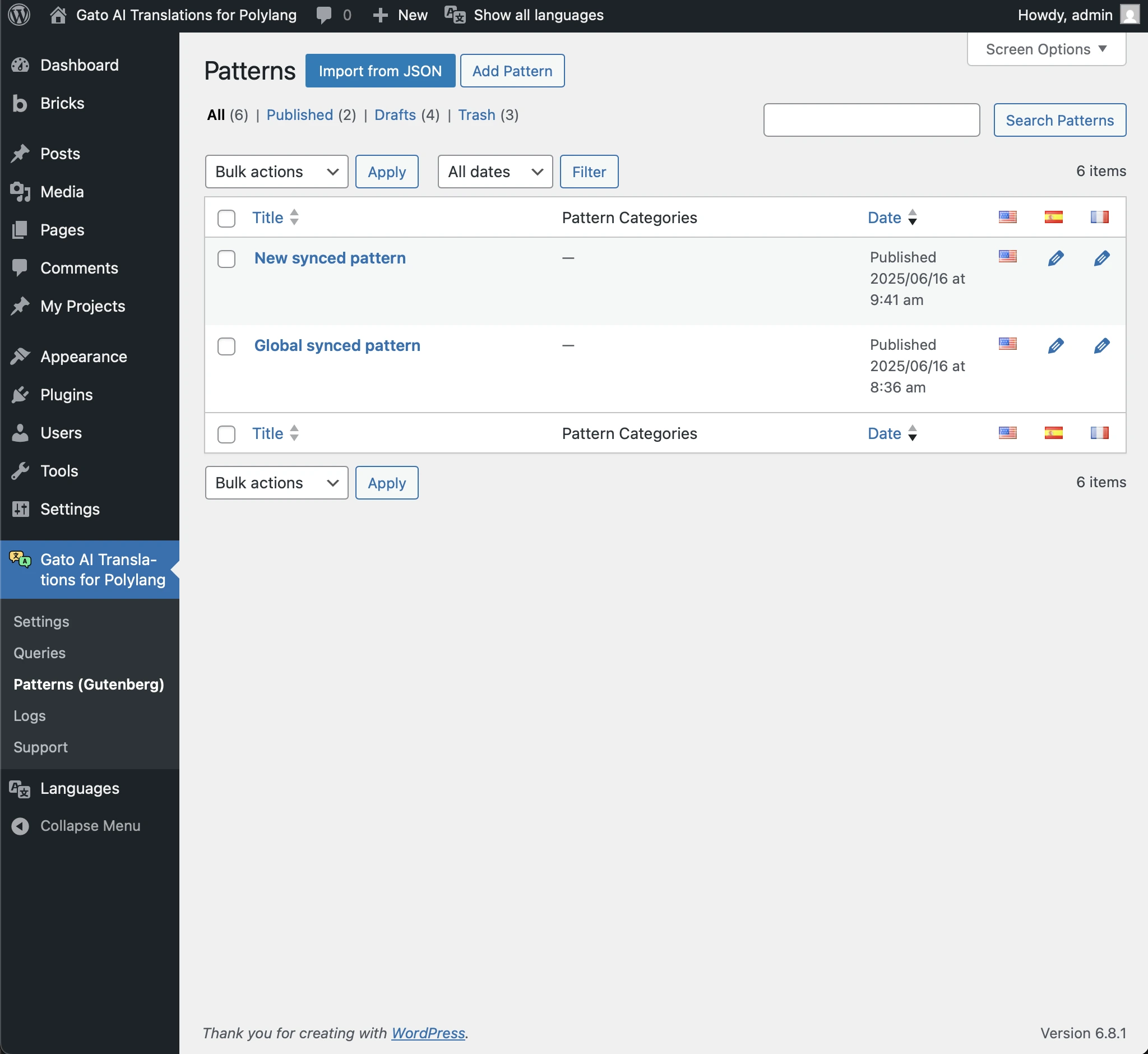
您可以从此页面翻译模式(与其他 CPT 类似):
- 发布时自动翻译新模式(从 Add Pattern 页面)
- 使用批量操作手动翻译现有模式
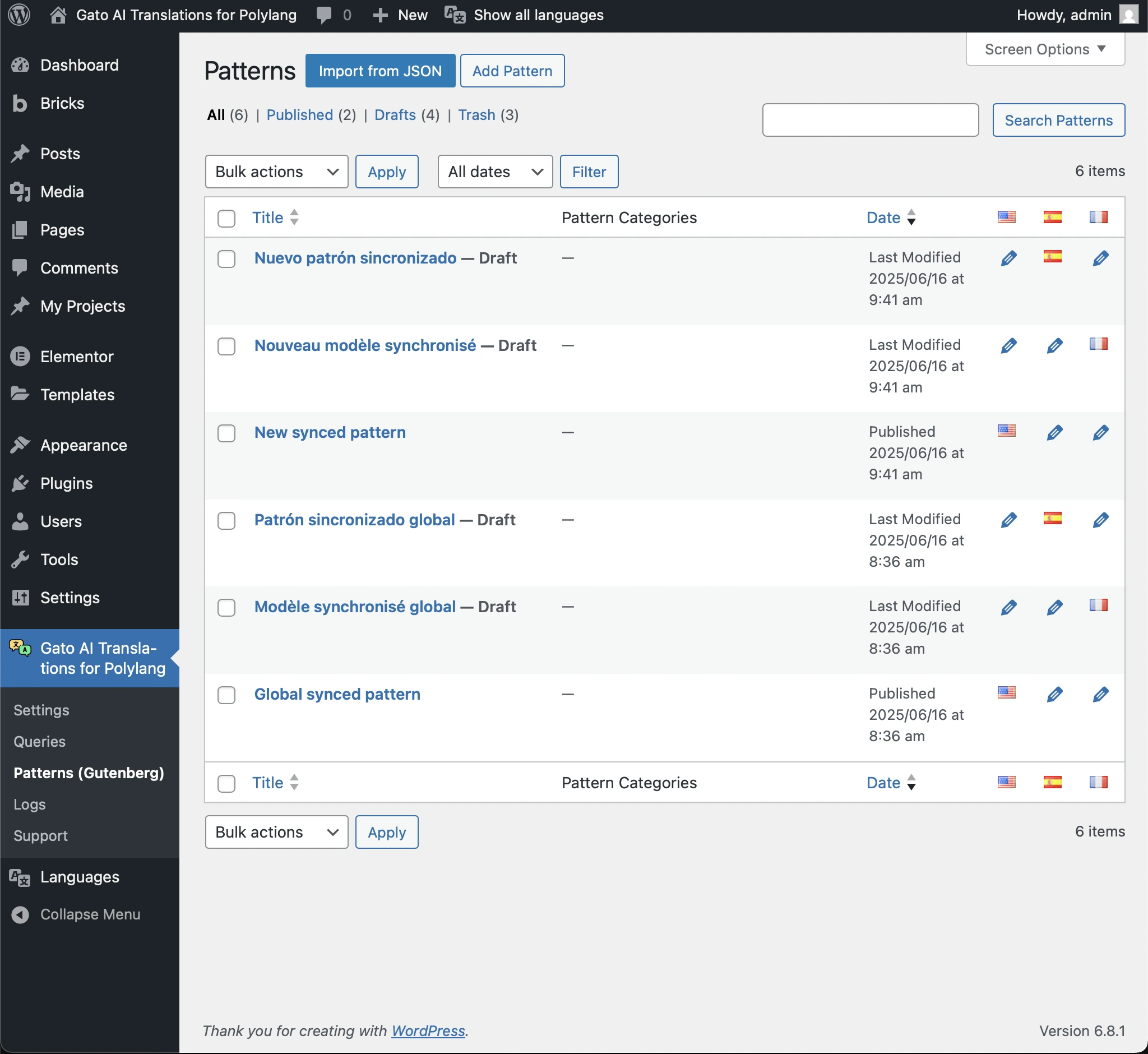
该页面还会显示已翻译的模式:
禁用自定义模式页面
您可以禁用菜单中 Patterns (Gutenberg) 页面的显示。
要禁用,请前往设置中的 Plugin Integration Configuration > Gutenberg,取消勾选 Enable the Custom Patterns page 复选框。