

文章未被翻译
如果您的自定义文章未被翻译,请查看日志以查找解释问题原因的错误或警告条目。
要解决问题,您可能需要根据需求配置设置,或者在文章包含过时/损坏数据的情况下重新创建文章。
最常见的原因及其解决方案如下:
不存在翻译条目
如果您看到如下警告:
Warning [Query "translate-customposts"] Execution successful, but with warnings: 🟡 No custom post(s) was translated, because no translation entries exist. In the plugin Settings, enable the 'Automatic creation of translation entries' option for CPT 'post'; or otherwise, create those translation entries using Polylang (clicking on the '+' link), then trigger the translation....这意味着自定义文章的翻译条目(在触发翻译之前)尚未创建。
在插件设置的 General Configuration 中,检查该 CPT 是否已启用 Automatic creation of translation entries 选项:
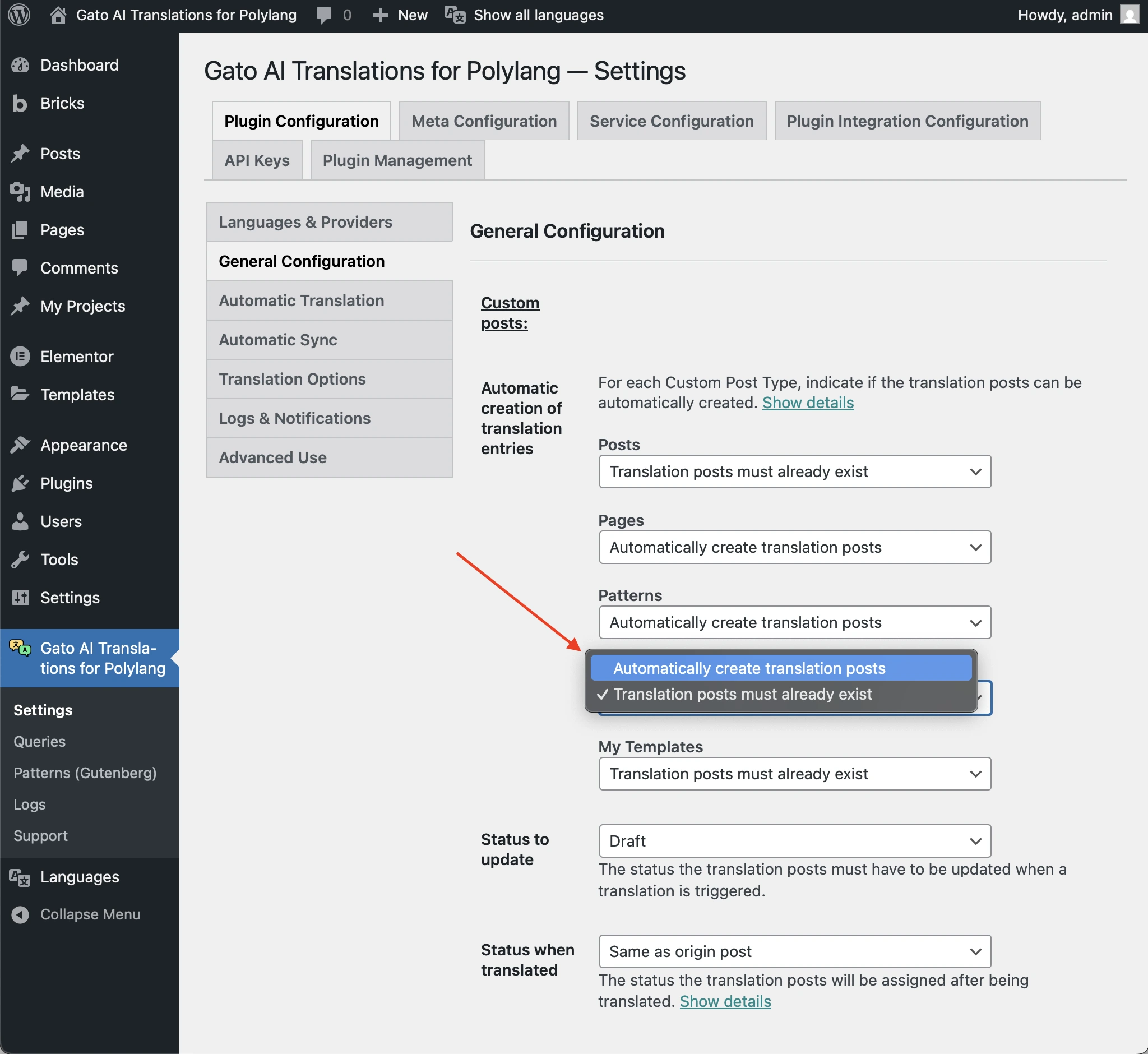
如果未启用,且该 CPT 使用 wp_insert_post 创建条目,则请启用该选项。
否则,您必须先使用 Polylang(点击 + 链接)创建翻译条目,然后再触发翻译。
翻译条目没有预期的状态
如果您看到如下警告:
Warning [Query "translate-customposts"] Execution successful, but with warnings: 🟡 No custom post(s) was translated, because the translation entries (CPT: 'post', IDs: [48634]) do not have the expected status: 'draft'. If this is unintended, either update the and/or 'Status to synchronize' options in the plugin Settings, or change the status of the translation entries accordingly....这意味着翻译条目的状态与插件设置中配置的状态不同。
例如,如果 Status to update 选项设置为 draft,而翻译条目的状态为 publish,则不会创建翻译。
在插件设置的 General Configuration 中,检查 Status to update 选项是否设置为预期状态:
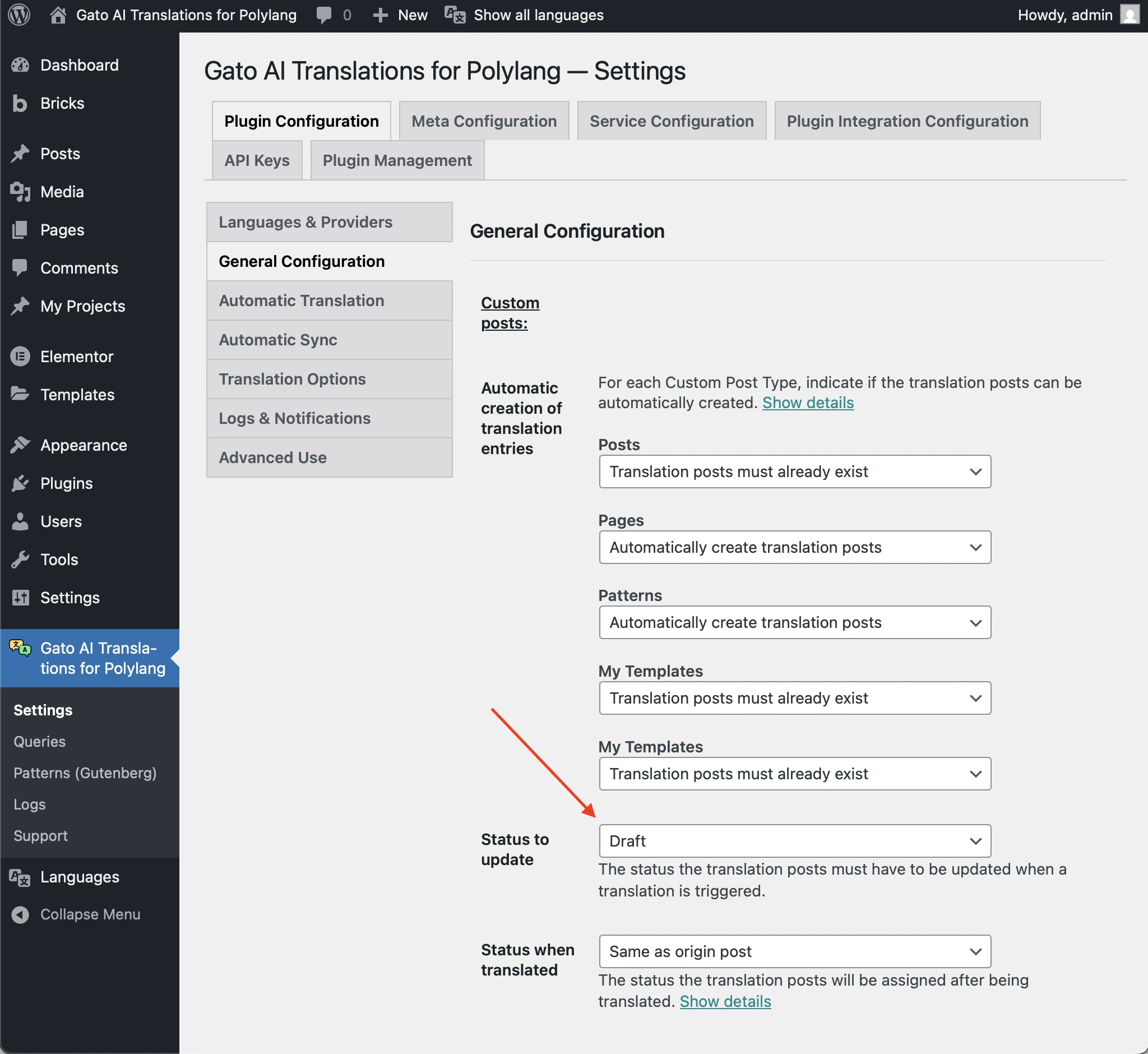
否则,请相应地更改翻译条目的状态。
文章包含过时/损坏的数据
如果您看到如下警告:
Warning [Query "translate-customposts"] Execution successful, but with warnings: 🟡 There are no custom posts to translate...且日志条目显示,即使文章有翻译文章,也无法识别它,那么该文章可能包含需要删除的过时/损坏数据。
例如,查看此日志条目中的"Additional context":
{
"queryExecutionResponse": {
"data": {
"originCustomPosts": [
{
"__typename": "GenericCustomPost",
"id": 16597,
"polylangLanguageLocale": {
"code": "en"
},
"polylangLanguage": "en",
"originCustomPostHasDefaultLanguage": true,
"isTranslateFromLanguageProvided": true,
"originCustomPostHasSpecificLanguage": true,
"canTranslateOriginPostFromSpecificLanguage": true,
"canTranslateOriginPost": true,
"customPostIDTranslationCustomPostIDLanguageIDs": {
"es": 16613
},
"hasTranslationCustomPosts": true
}
],
"customPostIDTranslationCustomPostIds": {
"16597": [
16613
]
},
"translationCustomPostIdsList": [
[
16613
]
],
"translationCustomPostIds": [
16613
],
"translationCustomPostIdToCustomPostIDs": {
"16613": 16597
},
"emptyTranslationCustomPostVars": [],
"hasTranslationCustomPosts": false
}
}
}在上述示例中,ID 为 16597 的英语原始文章("id": 16597, "polylangLanguageLocale": { "code": "en" })有一篇 ID 为 16613 的西班牙语翻译文章("customPostIDTranslationCustomPostIDLanguageIDs": { "es": 16613 }),但却无法识别它("hasTranslationCustomPosts": false)。
在这种情况下,ID 为 16613 的翻译文章已不再存在,但 ID 为 16597 的文章与该文章之间的 Polylang 关联尚未被删除。
由于这些过时/损坏的数据,插件无法翻译该文章。
要解决问题,您需要重新创建原始文章并对其进行翻译。然后,删除损坏的翻译文章。